Directory
Dagger Functions do not have access to the filesystem of the host you invoke the Dagger Function from (i.e. the host you execute a CLI command like dagger from). Instead, host files and directories need to be explicitly passed as command-line arguments to Dagger Functions.
There are two important reasons for this.
- Reproducibility: By providing a call-time mechanism to define and control the files available to a Dagger Function, Dagger guards against creating hidden dependencies on ambient properties of the host filesystem that could change at any moment.
- Security: By forcing you to explicitly specify which host files and directories a Dagger Function "sees" on every call, Dagger ensures that you're always 100% in control. This reduces the risk of third-party Dagger Functions gaining access to your data.
The Directory type represents the state of a directory. This could be either a local directory path or a remote Git reference.
Common operations
Some of the common operations available on the Directory type include:
| Field | Description |
|---|---|
dockerBuild | Builds a new Docker container from the directory |
entries | Returns a list of files and directories in the directory |
export | Writes the contents of the directory to a path on the host |
file | Returns a file at the given path as a File |
withFile / withFiles | Returns the directory plus the file(s) copied to the given path |
Reading workspace files
Inside a module, you don't take the user's project directory as a function argument. Instead, your module's constructor receives a Workspace that Dagger auto-populates from the current workspace, and you read directories and files from it lazily with Workspace.directory(path) and Workspace.file(path) — nothing is uploaded until a function actually uses it. See your SDK guide for the exact syntax.
Filters
When you pass a directory to a Dagger Function as argument, Dagger uploads everything in that directory tree to the Dagger Engine. For large monorepos or directories containing large-sized files, this can significantly slow down your Dagger Function while filesystem contents are transferred. To mitigate this problem, Dagger lets you apply filters to control which files and directories are uploaded.
Dagger offers pre- and post-call filtering to mitigate this problem and optimize how your directories are handled.
Filtering improves the performance of your Dagger Functions in three ways:
- It reduces the size of the files being transferred from the host to the Dagger Engine, allowing the upload step to complete faster.
- It ensures that minor unrelated changes in the source directory don't invalidate Dagger's build cache.
- It enables different use-cases, such as setting up component/feature/service-specific workflows for monorepos.
It is worth noting that Dagger already uses caching to optimize file uploads. Subsequent calls to a Dagger Function will only upload files that have changed since the preceding call. Filtering is an additional optimization that you can apply to improve the performance of your Dagger Function.
Pre-call filtering
Pre-call filtering means that a directory is filtered before it's uploaded to the Dagger Engine container. This is useful for:
-
Large monorepos. Typically your Dagger Function only operates on a subset of the monorepo, representing a specific component or feature. Uploading the entire worktree imposes a prohibitive cost.
-
Large files, such as audio/video files and other binary content. These files take time to upload. If they're not directly relevant, you'll usually want your Dagger Function to ignore them.
The .git directory is a good example of both these cases. It contains a lot
of data, including large binary objects, and for projects with a long version
history, it can sometimes be larger than your actual source code.
- Dependencies. If you're developing locally, you'll typically have your project dependencies installed locally:
node_modules(Node.js),.venv(Python),vendor(PHP) and so on. When you call your Dagger Function locally, Dagger will upload all these installed dependencies as well. This is both bad practice and inefficient. Typically, you'll want your Dagger Function to ignore locally-installed dependencies and only operate on the project source code.
Dagger Functions are not aware of the host filesystem, so they cannot
automatically read exclusion patterns from existing .dockerignore or
.gitignore files. You need to manually implement the same patterns in your
Dagger Function. At the time of writing, Dagger does not read exclusion
patterns from existing .dockerignore/.gitignore
files. If you already use these
files, you'll need to manually implement the same patterns in your Dagger
Function.
To implement a pre-call filter in your Dagger Function, add an ignore parameter to your Directory argument. The ignore parameter follows the .gitignore syntax. Some important points to keep in mind are:
- The order of arguments is significant: the pattern
"**", "!**"includes everything but"!**", "**"excludes everything. - Prefixing a path with
!negates a previous ignore: the pattern"!foo"has no effect, since nothing is previously ignored, while the pattern"**", "!foo"excludes everything exceptfoo.
- Go
- Python
- TypeScript
- PHP
- Java
Here's an example of a Dagger Function that excludes everything in a given directory except Go source code files:
package main

import (
	"context"
	"dagger/my-module/internal/dagger"
)

type MyModule struct{}

func (m *MyModule) Foo(
	ctx context.Context,
	// +ignore=["*", "!**/*.go", "!go.mod", "!go.sum"]
	source *dagger.Directory,
) (*dagger.Container, error) {
	return dag.
		Container().
		From("alpine:latest").
		WithDirectory("/src", source).
		Sync(ctx)
}
Here's an example of a Dagger Function that excludes everything in a given directory except Python source code files:
from typing import Annotated

import dagger
from dagger import Ignore, dag, function, object_type


@object_type
class MyModule:
    @function
    async def foo(
        self,
        source: Annotated[dagger.Directory, Ignore(["*", "!**/*.py"])],
    ) -> dagger.Container:
        return await (
            dag.container().from_("alpine:latest").with_directory("/src", source).sync()
        )
Here's an example of a Dagger Function that excludes everything in a given directory except TypeScript source code files:
import {
  dag,
  object,
  argument,
  func,
  Directory,
  Container,
} from "@dagger.io/dagger"

@object()
class MyModule {
  @func()
  async foo(
    @argument({ ignore: ["*", "!**/*.ts"] }) source: Directory,
  ): Promise<Container> {
    return await dag
      .container()
      .from("alpine:latest")
      .withDirectory("/src", source)
      .sync()
  }
}
Here's an example of a Dagger Function that excludes everything in a given directory except PHP source code files:
<?php

declare(strict_types=1);

namespace DaggerModule;

use Dagger\Attribute\{DaggerFunction, DaggerObject, Ignore};
use Dagger\{Container, Directory};

use function Dagger\dag;

#[DaggerObject]
class MyModule
{
    #[DaggerFunction]
    public function foo(
        #[Ignore('*', '!**/*.php', '!composer.json')]
        Directory $source,
    ): Container {
        return dag()
            ->container()
            ->from('alpine:latest')
            ->withDirectory('/src', $source)
            ->sync();
    }
}
Here's an example of a Dagger Function that excludes everything in a given directory except Java source code files:
package io.dagger.modules.mymodule;

import static io.dagger.client.Dagger.dag;

import io.dagger.client.Container;
import io.dagger.client.exception.DaggerQueryException;
import io.dagger.client.Directory;
import io.dagger.module.annotation.Function;
import io.dagger.module.annotation.Ignore;
import io.dagger.module.annotation.Object;
import java.util.concurrent.ExecutionException;

@Object
public class MyModule {

  @Function
  public Container foo(@Ignore({"*", "!**/*.java", "!pom.xml"}) Directory source)
      throws ExecutionException, DaggerQueryException, InterruptedException {
    return dag().container().from("alpine:latest").withDirectory("/src", source).sync();
  }
}
Here are a few examples of useful patterns:
- Go
- Python
- TypeScript
- PHP
- Java
// exclude Go tests and test data
// +ignore=["**_test.go", "**/testdata/**"]

// exclude binaries
// +ignore=["bin"]

// exclude Python dependencies
// +ignore=["**/.venv", "**/__pycache__"]

// exclude Node.js dependencies
// +ignore=["**/node_modules"]

// exclude Git metadata
// +ignore=[".git", "**/.gitignore"]
You can also split them into multiple lines:
// +ignore=[
//   "**_test.go",
//   "**/testdata/**"
// ]
# exclude Pytest tests and test data
Ignore(["tests/", ".pytest_cache"])
# exclude binaries
Ignore(["bin"])
# exclude Python dependencies
Ignore(["**/.venv", "**/__pycache__"])
# exclude Node.js dependencies

Ignore(["**/node_modules"])

# exclude Git metadata

Ignore([".git", "**/.gitignore"])
// exclude Mocha tests
@argument({ ignore: ["**.spec.ts"] })

// exclude binaries
@argument({ ignore: ["bin"] })

// exclude Python dependencies
@argument({ ignore: ["**/.venv", "**/__pycache__"] })

// exclude Node.js dependencies
@argument({ ignore: ["**/node_modules"] })

// exclude Git metadata
@argument({ ignore: [".git", "**/.gitignore"] })
// exclude PHPUnit tests and test data
#[Ignore('tests/', '.phpunit.cache', '.phpunit.result.cache')]

// exclude binaries #[Ignore('bin')]

// exclude Composer dependencies #[Ignore('vendor/')]

// exclude Node.js dependencies #[Ignore('**/node_modules')]

// exclude Git metadata #[Ignore('.git/', '**/.gitignore')]
// exclude Java tests and test data
@Ignore({"src/test"})

// exclude binaries
@Ignore({"bin"})

// exclude Python dependencies
@Ignore({"**/.venv", "**/__pycache__"})

// exclude Node.js dependencies
@Ignore({"**/node_modules"})

// exclude Git metadata
@Ignore({".git", "**/.gitignore"})
Post-call filtering
Post-call filtering means that a directory is filtered after it's uploaded to the Dagger Engine.
This is useful when working with directories that are modified "in place" by a Dagger Function. When building an application, your Dagger Function might modify the source directory during the build by adding new files to it. A post-call filter allows you to use that directory in another operation, only fetching the new files and ignoring the old ones.
A good example of this is a multi-stage build. Imagine a Dagger Function that reads and builds an application from source, placing the compiled binaries in a new sub-directory (stage 1). Instead of then transferring everything to the final container image for distribution (stage 2), you could use a post-call filter to transfer only the compiled files.
- Go
- Python
- TypeScript
- PHP
- Java
To implement a post-call filter in your Dagger Function, use the DirectoryWithDirectoryOpts or ContainerWithDirectoryOpts structs, which support Include and Exclude patterns for Directory objects. Here's an example:
package main

import (
	"context"
	"dagger/my-module/internal/dagger"
)

type MyModule struct{}

func (m *MyModule) Foo(
	ctx context.Context,
	source *dagger.Directory,
) *dagger.Container {
	builder := dag.
		Container().
		From("golang:latest").
		WithDirectory("/src", source, dagger.ContainerWithDirectoryOpts{Exclude: []string{"*.git", "internal"}}).
		WithWorkdir("/src/hello").
		WithExec([]string{"go", "build", "-o", "hello.bin", "."})
	return dag.
		Container().
		From("alpine:latest").
		WithDirectory("/app", builder.Directory("/src/hello"), dagger.ContainerWithDirectoryOpts{Include: []string{"hello.bin"}}).
		WithEntrypoint([]string{"/app/hello.bin"})
}
To implement a post-call filter in your Dagger Function, use the include and exclude parameters when working with Directory objects. Here's an example:
import dagger
from dagger import dag, function, object_type


@object_type
class MyModule:
    @function
    def foo(self, source: dagger.Directory) -> dagger.Container:
        builder = (
            dag.container()
            .from_("golang:latest")
            .with_directory("/src", source, exclude=["*.git", "internal"])
            .with_workdir("/src/hello")
            .with_exec(["go", "build", "-o", "hello.bin", "."])
        )

        return (
            dag.container()
            .from_("alpine:latest")
            .with_directory(
                "/app", builder.directory("/src/hello"), include=["hello.bin"]
            )
            .with_entrypoint(["/app/hello.bin"])
        )
To implement a post-call filter in your Dagger Function, use the include and exclude parameters when working with Directory objects. Here's an example:
import { dag, Container, Directory, object, func } from "@dagger.io/dagger"

@object()
class MyModule {
  @func()
  foo(source: Directory): Container {
    const builder = dag
      .container()
      .from("golang:latest")
      .withDirectory("/src", source, { exclude: ["*.git", "internal"] })
      .withWorkdir("/src/hello")
      .withExec(["go", "build", "-o", "hello.bin", "."])

    return dag
      .container()
      .from("alpine:latest")
      .withDirectory("/app", builder.directory("/src/hello"), {
        include: ["hello.bin"],
      })
      .withEntrypoint(["/app/hello.bin"])
  }
}
To implement a post-call filter in your Dagger Function, use the include and exclude parameters when working with Directory objects. Here's an example:
<?php

declare(strict_types=1);

namespace DaggerModule;

use Dagger\Attribute\{DaggerFunction, DaggerObject};
use Dagger\{Container, Directory};

use function Dagger\dag;

#[DaggerObject]
class MyModule
{
    #[DaggerFunction]
    public function foo(Directory $source): Container
    {
        $builder = dag()
            ->container()
            ->from('golang:latest')
            ->withDirectory('/src', $source, exclude: ['*.git', 'internal'])
            ->withWorkdir('/src/hello')
            ->withExec(['go', 'build', '-o', 'hello.bin', '.']);

        return dag()
            ->container()
            ->from('alpine:latest')
            ->withDirectory('/app', $builder->directory('/src/hello'), include: ['hello.bin'])
            ->withEntrypoint(['/app/hello.bin']);
    }
}
To implement a post-call filter in your Dagger Function, use the Container.WithDirectoryArguments class which support withInclude and withExclude functions when working with Directory objects. Here's an example:
package io.dagger.modules.mymodule;

import static io.dagger.client.Dagger.dag;

import io.dagger.client.Container;
import io.dagger.client.Directory;
import io.dagger.module.annotation.Function;
import io.dagger.module.annotation.Object;
import java.util.List;

@Object
public class MyModule {
  @Function
  public Container foo(Directory source) {
    Container builder =
        dag()
            .container()
            .from("golang:latest")
            .withDirectory(
                "/src",
                source,
                new Container.WithDirectoryArguments().withExclude(List.of("*.git", "internal")))
            .withWorkdir("/src/hello")
            .withExec(List.of("go", "build", "-o", "hello.bin", "."));

    return dag()
        .container()
        .from("alpine:latest")
        .withDirectory(
            "/app",
            builder.directory("/src/hello"),
            new Container.WithDirectoryArguments().withInclude(List.of("hello.bin")))
        .withEntrypoint(List.of("/app/hello.bin"));
  }
}
Here are a few examples of useful patterns:
- Go
- Python
- TypeScript
- PHP
- Java
// exclude all Markdown files
dirOpts := dagger.ContainerWithDirectoryOpts{
  Exclude: "*.md*",
}

// include only the build output directory
dirOpts := dagger.ContainerWithDirectoryOpts{
Include: "build",
}

// include only ZIP files
dirOpts := dagger.DirectoryWithDirectoryOpts{
Include: "\*.zip",
}

// exclude Git metadata
dirOpts := dagger.DirectoryWithDirectoryOpts{
Exclude: "\*.git",
}
# exclude all Markdown files
dir_opts = {"exclude": ["*.md*"]}

# include only the build output directory
dir_opts = {"include": ["build"]}

# include only ZIP files
dir_opts = {"include": ["*.zip"]}

# exclude Git metadata
dir_opts = {"exclude": ["*.git"]}
// exclude all Markdown files
const dirOpts = { exclude: ["*.md*"] }

// include only the build output directory
const dirOpts = { include: ["build"] }

// include only ZIP files
const dirOpts = { include: ["*.zip"] }

// exclude Git metadata
const dirOpts = { exclude: ["*.git"] }
// exclude all Markdown files
$dirOpts = ['exclude' => ['*.md*']];

// include only the build output directory
$dirOpts = ['include' => ['build']];

// include only ZIP files
$dirOpts = ['include' => ['*.zip']];

// exclude Git metadata
$dirOpts = ['exclude' => ['*.git']];
// exclude all Markdown files
var dirOpts = new Container.WithDirectoryArguments()
    .withExclude(List.of("*.md*"));

// include only the build output directory
var dirOpts = new Container.WithDirectoryArguments()
    .withInclude(List.of("build"));

// include only ZIP files
var dirOpts = new Container.WithDirectoryArguments()
    .withInclude(List.of("*.zip"));

// exclude Git metadata
var dirOpts = new Container.WithDirectoryArguments()
    .withExclude(List.of("*.git"));
Mounts
When working with directories and files, you can choose whether to copy or mount them in the containers created by your Dagger Function. The Dagger API provides the following methods:
Container.withDirectory()returns a container plus a directory written at the given pathContainer.withFile()returns a container plus a file written at the given pathContainer.withMountedDirectory()returns a container plus a directory mounted at the given pathContainer.withMountedFile()returns a container plus a file mounted at the given path
Mounts only take effect within your workflow invocation; they are not copied to, or included, in the final image. In addition, any changes to mounted files and/or directories will only be reflected in the target directory and not in the mount sources.
Besides helping with the final image size, mounts are more performant and resource-efficient. The rule of thumb should be to always use mounts where possible.
Debugging
Using logs
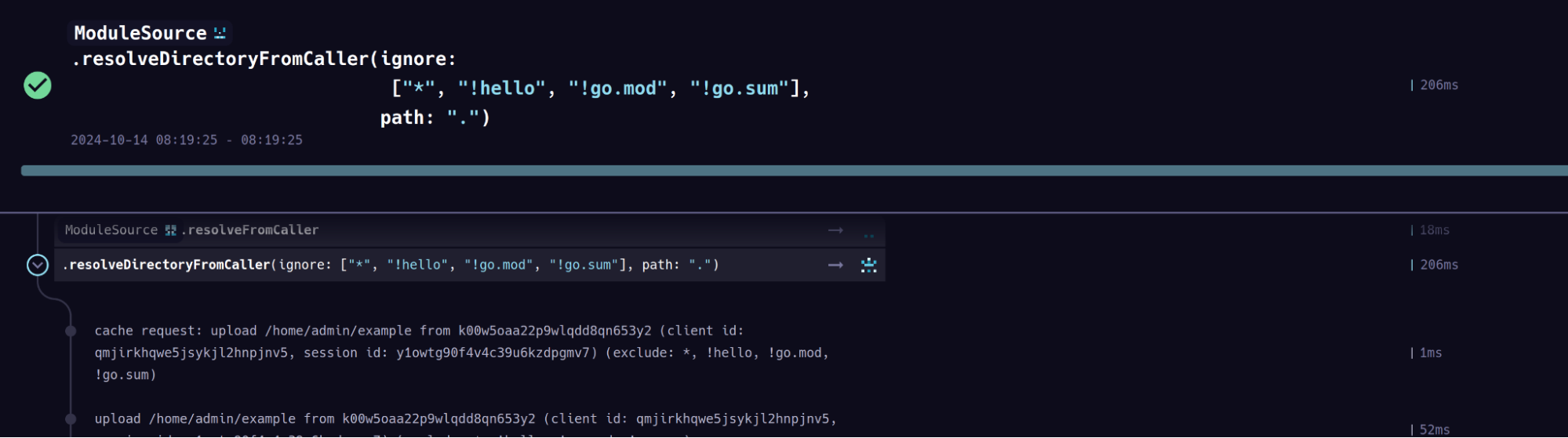
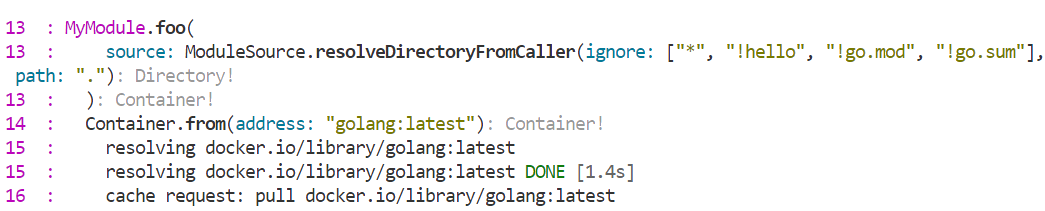
Both Dagger Cloud and the Dagger TUI provide detailed information on the patterns Dagger uses to filter your directory uploads - look for the upload step in the TUI logs or Trace:
Inspecting directory contents
Another way to debug how directories are being filtered is to create a function that receives a Directory as input, and returns the same Directory:
- Go
- Python
- TypeScript
- PHP
- Java
func (m *MyModule) Debug(
  ctx context.Context,
  // +ignore=["*", "!analytics"]
  source *dagger.Directory,
) *dagger.Directory {
  return source
}
@function
async def foo(
    self,
    source: Annotated[
        dagger.Directory, Ignore(["*", "!analytics"])
    ],
) -> dagger.Directory:
    return source
@func()
debug(
   @argument({ ignore: ["*", "!analytics"] }) source: Directory,
): Directory {
  return source
}
    #[DaggerFunction]
    public function debug(
        #[Ignore('*'/, '!analytics')]
        Directory $source,
    ): Directory {
        return $source;
    }
@Function
public Directory debug(@Ignore({"*", "!analytics"}) Directory source) {
    return source;
}
Calling the function will show you the directory’s digest and top level entries. The digest is content addressed, so it changes if there are changes in the contents of the directory. Looking at the entries field you may be able to spot an interloper: ` You can open the directory in an interactive terminal to inspect the filesystem:
You can export the filtered directory to your host and check it with local tools: